
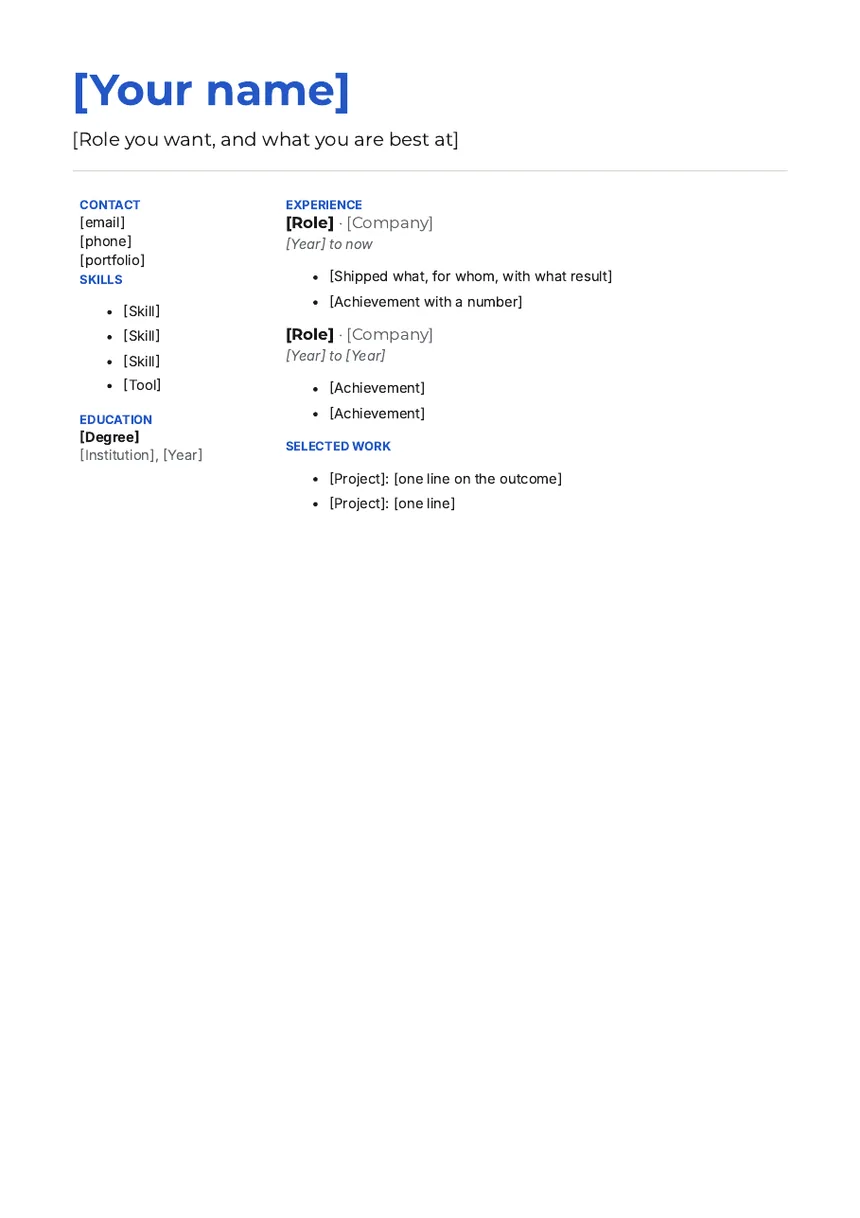
What this template is for
Hiring managers in design, product, engineering and marketing read for two things: what you shipped, and whether you can explain it. A two-column page shows both. The side column holds the facts a recruiter scans for, so the main column can tell the story of your work.
It also suits people changing careers. The Selected work section lets you show projects that were not jobs: a side project, a volunteer build, a course project with a real user.
- Fonts
- Montserrat for headings, Inter for text
- Paper
- A4, one page
- Margins
- 0.6 in top and bottom, 0.7 in left and right
- File
- Word .docx
What is in it, section by section
- Name and headlineYour name in Montserrat, in colour. Under it, the role you want and what you are best at, in one line.
- ContactIn the side column: email, phone and a portfolio link.
- SkillsFour short items in the side column. Tools count here.
- EducationDegree in bold, then the institution and year.
- ExperienceIn the main column: role, company and dates, then points on what you shipped, for whom and with what result.
- Selected workTwo projects, one line each on the outcome. Link them if you can.
How to fill it in
- Write the headline first. It decides what the rest of the page has to prove.
- Fill the side column with facts only. Keep each skill to one or two words.
- For each role, write what you shipped before what you were responsible for.
- Pick selected work that matches the job you want, not just your favourite project.
- Keep the two columns close in length so the page looks even.
Questions
Do two-column resumes work with job portals?
Most portals read the file, but some older ones read columns out of order. If a portal scrambles your upload, paste the text into its form instead, or use the classic resume, which has one column.
Can I change the blue?
Yes. Select your name and pick a new colour from the font colour menu. Use the same colour for the small capital labels so the page keeps one accent.
Which fonts does it use?
Inter for the text and Montserrat for the name and headings. Both are free fonts with open licences. If one is missing, Word shows a similar sans in its place.
How many skills should I list?
Four to eight. List the ones the job post names that you could prove in an interview.
Use it in Supernatural
Supernatural: everything your business runs on, with Blue as your part-time admin. Word is one of its apps. In your workspace, you ask Blue for “a modern resume for a product designer”. Blue starts from this template, writes in what you give it, and leaves [brackets] where something is missing. Before it makes the document, Blue shows you which template it chose and what it will write. Nothing is made until you say yes.
The beta is free and asks for no card.
More free templates
Last updated 3 November 2026.